Instant subtitles
Advanced AI speech recognition delivers accurate transcriptions and translations with near-zero latency.
Break down language barriers instantly with Transpera AI. Whether you manage a global remote team, attend international webinars, or chat with clients overseas, get blazing-fast, highly accurate subtitles directly in your meeting tab.
5.0 Chrome Web Store rating. Privacy-first. No meeting audio stored.
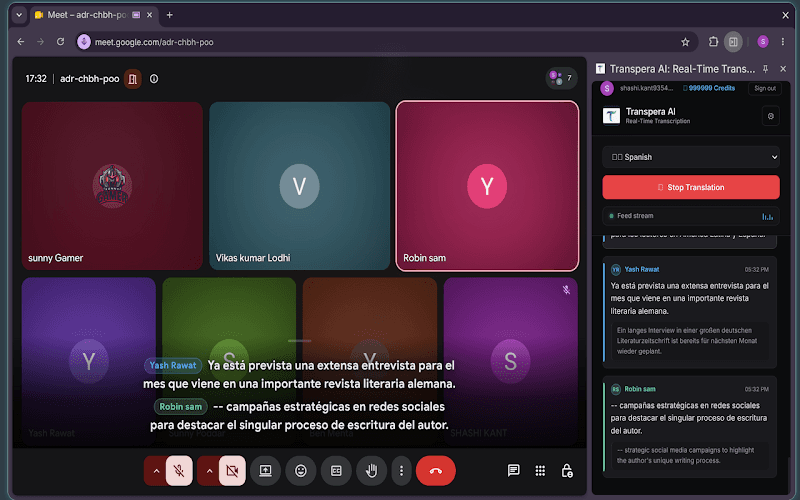
Advanced AI speech recognition delivers accurate transcriptions and translations with near-zero latency.
No clunky software to download. Open the side panel, click start, and let the AI handle the rest.
Smart silent audio capture hears both you and meeting participants without echo or feedback.
Built to blend naturally into your active meeting tab on Google Meet and other web meeting platforms.
Live translation
Watch real-time translated subtitles appear in the side panel as participants speak. Switch output languages on the fly and follow every exchange without leaving your meeting.
From install to live subtitles in under a minute.
Click the Transpera AI icon in Chrome to open the extension side panel.
Log in to authenticate your session and connect your Transpera account.
Start your meeting and watch real-time translated subtitles appear as people speak.
We capture audio locally and process it securely solely to generate live translations. We do not store your meeting audio.
What teams ask before rolling out live meeting translation.
It is a Chrome extension that provides real-time transcription and translation subtitles for web meetings directly inside your browser.
The extension uses smart silent audio capture to hear both your microphone and meeting participants clearly, without echo or audio feedback.
Install the Transpera AI Chrome extension and bring real-time translated subtitles to your next web meeting.