AI-Native Data and Content Intelligence Platform

Transpera is an AI-native multilingual data and content intelligence platform to generate and transform content for video, audio, music and documents, and provide data intelligence, supporting 130+ languages with automated workflows and scalable for enterprises.

Content Studio · One place to begin

Your content.
Without boundaries.

Create video from text and a reference image. Explore dubbing, captions, music, narration, voice cloning and transcription, all in one content studio.

Content Studio, slide 1 of 4

Drop your content here

Choose one or multiple files from your device.

PDFWordInDesignImagesExcel / CSVAudioVideo
Continue in workspace

Files stay on your device until submitted through a processing tool. Available formats and limits vary by service.

Agents. Solutions. One platform.

Multiple agents. One platform. Connected with automated workflows.

Content Studio

Generate. Transform. Connect.

From the first idea to a new audience, bring your video, music and voice work together.

Video generation

Start with a scene.

Describe the scene. Add an optional reference image to guide its look.

Create your first video brief
An idea to begin withExample brief
A quiet morning in a mountain village. Warm sunlight. A slow camera movement across the rooftops.
Text prompt+ Optional reference image

This is a creative brief, not a generated video.

Video, beyond one audience

Let the story travel.

Supplied captioned sample

Pre-generated sample supplied by the Transpera team. Playing it does not run a captioning or dubbing job.

Video Dubbing

Choose a new language, with optional lip sync and a transcript review step when lip sync is off.

Explore Video Dubbing

Video Caption

Keep the message readable with burned captions or switchable soft captions in a compatible player.

Explore Video Caption
Audio, in one studio

Music. Voice. Every word.

Create a soundtrack. Give your script a voice. Bring every recording to a new audience.

Create a soundtrack

Music generation

Start with a theme or your own lyrics, then shape the duration, vocals and musical style.

Your creative directionA story. A mantra. Your own lyrics.
  1. 01Start with lyrics
  2. 02Shape the sound
  3. 03Make music
Give your words a voice

Audio generation

Bring a script, PDF or Word document. Choose the voice and language for your narration.

Text, PDF or Word→Narration
Choose the voice. Set the language.
Reach a new audience

Voice Dubbing

Adapt a recording for another language or prepare a voice-cloning task with the owner’s consent.

  • Audio dubbing
  • Authorized voice cloning
Turn speech into text

Audio Transcription

Move from a recording to readable text, in the original audio language or one you select.

  • Upload a recording
  • Prepare a transcript

Doc Studio

Make every document work harder.

Extract information, summarize key points and prepare content for the next step.

First, make it usable

Read more than the words.

Bring text and tables out of a PDF or scan so you can work with the content.

Explore Extraction
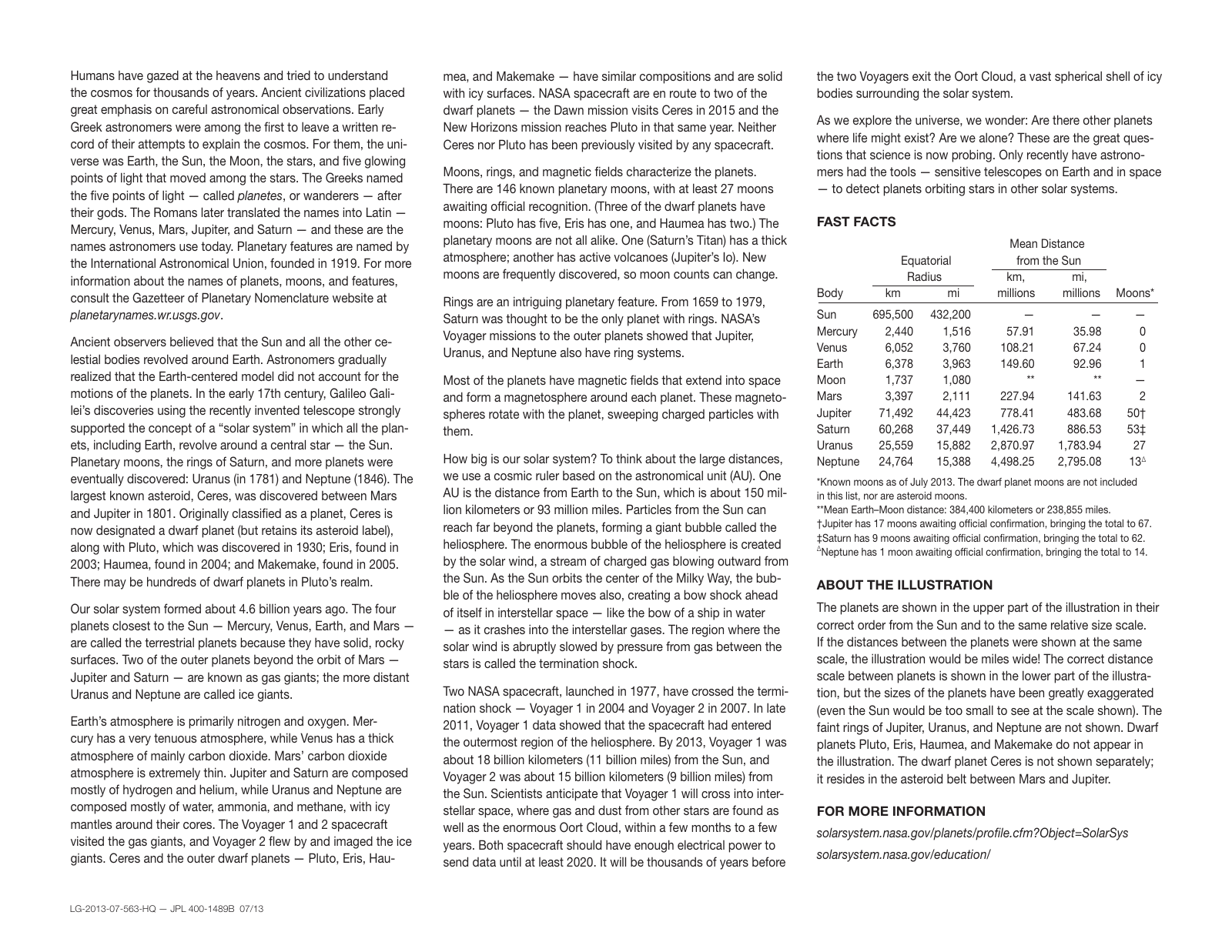
From the supplied NASA/JPL excerpt
Grouped table values, kept together
BodyRadius · kmDistance · million km
Mercury2,44057.91
Venus6,052108.21
Prepared from the source PDF, not a live OCR result.
Inspect the source and extraction example
Original PDF · selected regions
Original PDF paragraph about terrestrial planets, gas giants and ice giants
Original table headers: Body, Equatorial Radius and Mean Distance from the Sun, with kilometres and milesOriginal Mercury and Venus table rows with radius and distance values

Cropped from columns 1 and 3. Only the extracted paragraph, headings and two rows are shown.

Open source PDF ↗

Structured extract · English

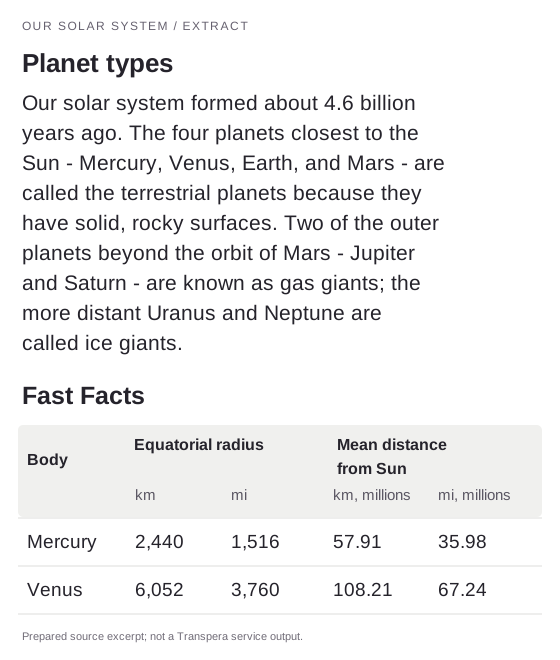
Formatted extraction image: planet types paragraph and Mercury and Venus rows with grouped radius and distance headersDownload extracted document image
Read extracted text and table

Paragraph from column 1

Our solar system formed about 4.6 billion years ago. The four planets closest to the Sun - Mercury, Venus, Earth, and Mars - are called the terrestrial planets because they have solid, rocky surfaces. Two of the outer planets beyond the orbit of Mars - Jupiter and Saturn - are known as gas giants; the more distant Uranus and Neptune are called ice giants.

Fast Facts · two rows from column 3
BodyEquatorial RadiusMean Distance from the Sun
kmmimillion kmmillion mi
Mercury2,4401,51657.9135.98
Venus6,0523,760108.2167.24

An excerpt, not the full extraction. Grouped headers, units and numeric cells are retained; the source table's moon-count column is omitted.

Source: Our Solar System, NASA/JPL, July 2013. Actual PDF text extracted locally; punctuation and spacing normalized. Table cells checked against the source and arranged as HTML. This is a prepared structure example from a selectable-text PDF, not an OCR result from a scan or the Transpera service.

Translation

The same page. A different language.

See a supplied Hindi-to-Bengali article, then switch to the multilingual text example.

Explore Translation

Same story. A new language.

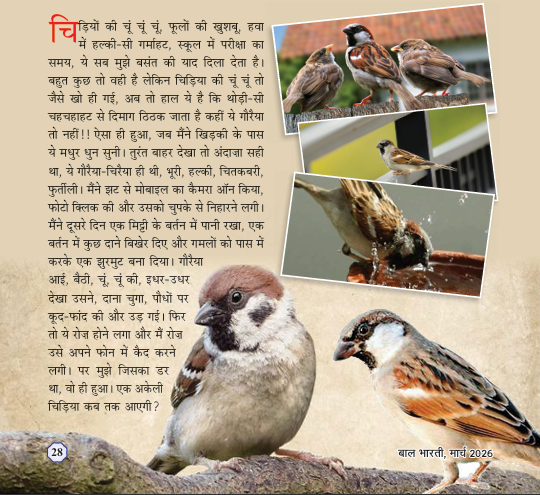
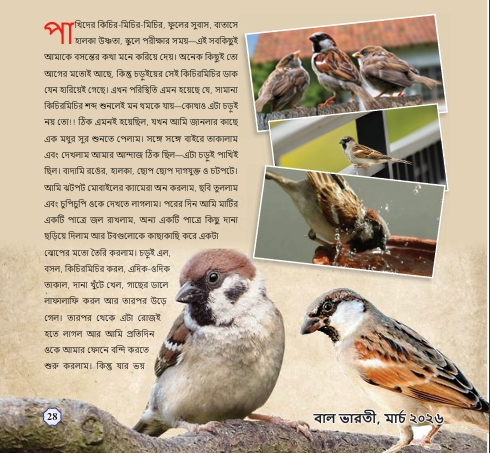
An illustrated magazine page translated from Hindi to Bengali, with its photography and page composition carried across.

Hindi Bengali
Original documentHindi
Hindi magazine excerpt about sparrows, with photographs and formatted article text
Translated documentBengali
Bengali magazine excerpt about sparrows, with photographs and formatted article text

Supplied Hindi-to-Bengali document translation example. The matching excerpts show the article text, photographs and page layout.

A different script. The same words.

Transliteration

Change the writing system, not the language. Make the same words easier for your readers to follow.

Devanagariहमारा सौरमंडल
Latin scriptHamārā sauramaṇḍal
Prepared script example · the same Hindi words
Less to read. More to take away.

Summary

Turn a longer document into a focused brief, with instructions about what matters to you.

Give your brief a focus

For a long policy, research paper or agreement, start by telling the workspace which questions your brief should answer.

  • Your document
  • Your instructions
  • A focused brief

Insight Hub

Turn information into informed decisions.

Analyze findings, explore relationships and compare key data in one place.

Understand the findings

Analytics

Bring findings, commercial terms and supporting detail into one review.

One source. Different perspectives.Supplied example

A financing conversation, made easier to review.

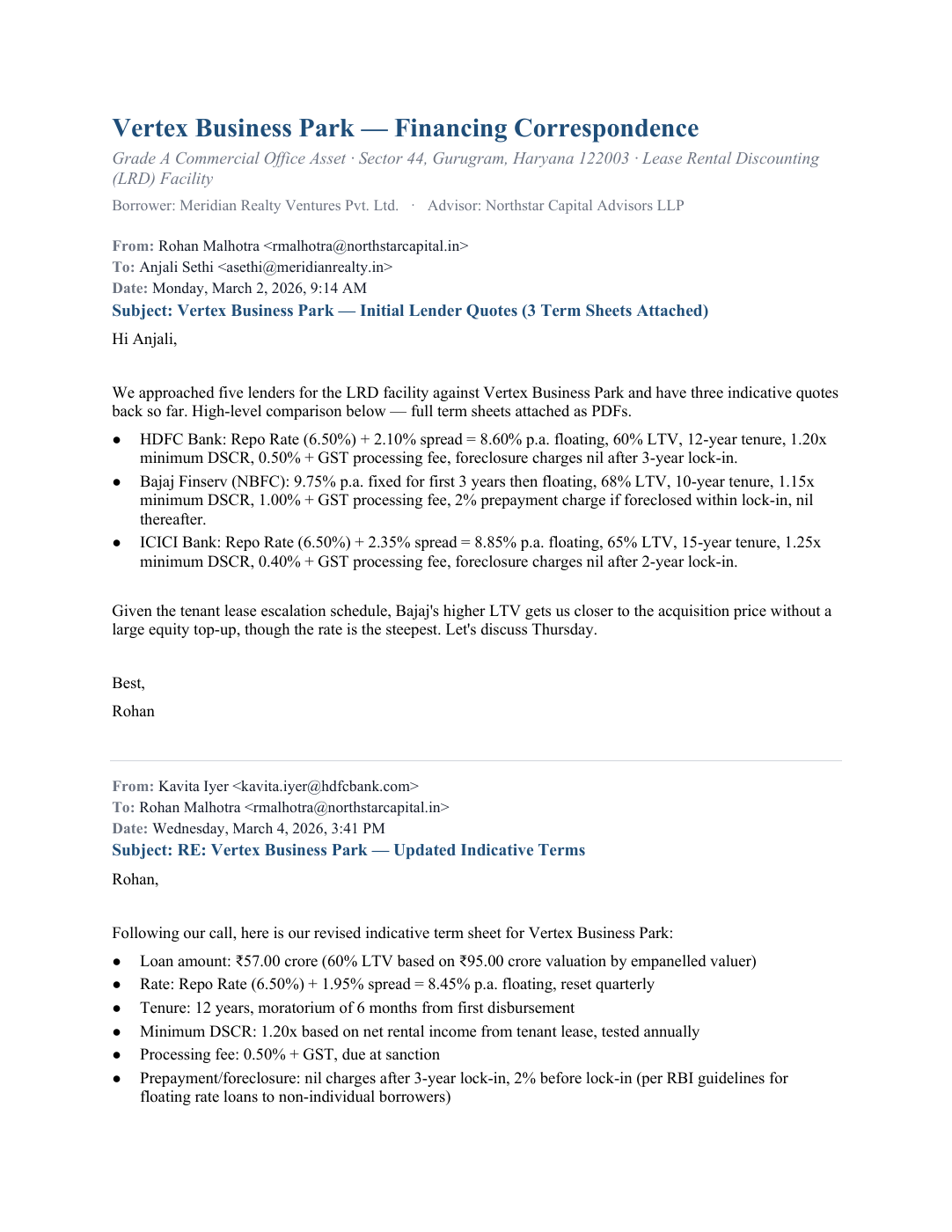
The supplied Vertex Business Park example brings bank quotations, correspondence and final terms into the same picture.

Explore the example
Page 1 of the source email conversation PDFSource document · 5 pagesEmail conversationVertex Business Park financing correspondenceView source
Prepared output from the source conversation

Vertex Business Park LRD Facility Analysis

Explore the supplied report’s overview, financial terms, timeline and detailed tables.

Download report ↓

The supplied HTML report is shown in an isolated preview. Its own tabs and controls remain available.

Input and both generated outputs supplied by the Transpera team. This example is pre-generated, not a live analysis of an uploaded file.

Meeting Assist

Every meeting. A shared understanding.

Follow the conversation with multilingual executive notes, live subtitles and speaker identification.

Meeting Assist · Dedicated workspace

Be part of the conversation.

Follow Google Meet and Microsoft Teams with executive notes, translated subtitles and speaker-attributed transcripts.

Explore Meeting Assist
  1. 01Open Meeting Assist
  2. 02Connect your calendar
  3. 03Join and understand

Meeting Assist opens in its own website. This dashboard does not capture audio or generate meeting minutes.

Chatbot Builder

Your knowledge. Ready for a conversation.

Build a chatbot around your organization’s approved content, with a clear identity and website setup.

Chatbot Builder

Help people find the answers.

Start with approved manuals, policies and reference material. Define an assistant that helps people find their way through it.

Explore Chatbot Builder
IdentityReference dataWebsite setup

Three steps to prepare your assistant. A live chatbot service is not connected in this dashboard.

Workflows

Give repeat work a better route.

Connect the steps your team already uses, then follow the process from start to finish.

A process you can return to

Start once. Connect the next step.

For a publishing team, a document can be the starting point for another language, an audio version and a brief for review.

  1. 01Extract

    Read the source

  2. 02Translate

    Reach a new reader

  3. 03Narrate

    Offer a listening format

Explore Workflows

Illustrative sequence. The visual builder and execution run in the separate Workflows app.

Your next project / Let’s talk

What are you working on?

A document. A course. A conversation. Let’s find the right workflow for it.

Start a conversation

Tell us about your content, languages, and team. We’ll walk you through Transpera.